1 - Group accounts


If you want several users to have the same access rights to your FTP Server it's a good idea to setup one group account for all of them rather than having to define the same options in each account. This is a handy method to handle large numbers of users/user rights without too much of work.

Note :
- you can not connect on a group account, you need to connect under a user account which is member of the group.
- you can have an unlimited number of groups, one user can be member of multiple groups.

Creation :

In the domain : click on Groups folder, right click and select 'New', a new window will open asking for the name of the new account.

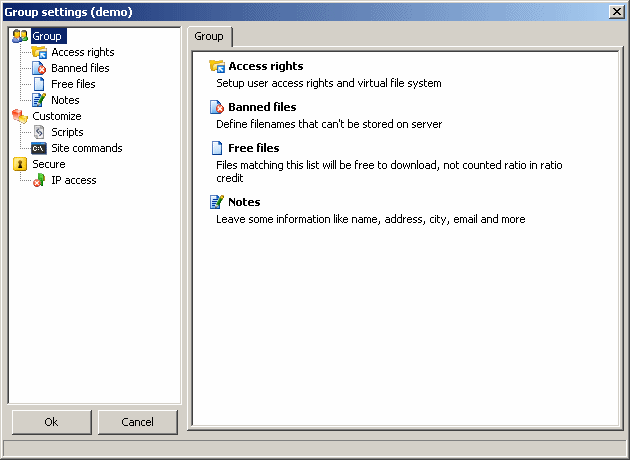
630x460 (13848 bytes)


Clicking on each main category (Groups, Customize, Secure) will bring a summary page detailing each sub category.

 2 - Access rights


Group's access rights are assigned to all users of the group when they connect but specifying custom access rights to the users is still possible under the user account.

The result will be : user access rights + group access rights.

Note :
- user's access rights always have priority over his group's settings.
- if the user account redefines an access rights, the user's access right will overwrite the group's access right one)

See : Virtual File System

 3 - Free files


This option is the same as in user account.

Group's free files will be added to user account's free files list.

 4 - Banned files


This option is the same as in user account.

Group's banned files will be added to user account's banned files list.

 5 - Notes


This is where you can give some information about the group.

 6 - Scripts


This option is the same as in user account.

Group's script will be added to user's scripts list.
(the same scripts are available for users and groups)

 7 - SITE commands


This option is the same as in user account.

Group's SITE Commands will be added to user's SITE Commands list.
(user's SITE Commands will overwrite group's SITE Commands with the same name)

 8 - IP Access


This option is the same as in user account.

Group's IP access rules will be added to user's IP access rules list.
(user's IP access rules will overwrite group's IP access rules if the rules' IP/Host is the same)