1 - Overview


Domain information reports data like activity on your server, you can check who is connected and what they are doing, it is also the place where you add / remove temporary ban and lastly where you can check the overall traffic of your domain.

 2 - Activity


Current connected users and their activity on your domain will be reported on this page.
Reported information is : ID, User, IP, Current directory, Last command, Connected since, Speed.

By right clicking, you can copy IP/hostname to clipboard, view or hide clients idling/downloading/uploading, group by IP/last command/username.

This permits a better view of the server activity :
- group by IP : you can see who is connected multiple times or using mass downloader tools.
- group by last command : you can see which file is being downloaded the most.
- group by username : you can view connections and activity per account.

View log : allows you to split the activity window and display a log or report at the same time.

 3 - Log


Domain log reports commands from user and replies from the ftp server for your domain.
You can create them at domain level / logs & reports see : Domains

 4 - Temporary ban


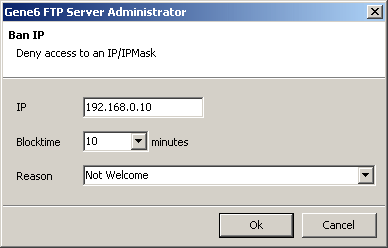
The list of IP currently banned from accessing your server.

Right click and select add to setup a new ban.

388x248 (7042 bytes)


After the blocktime expiration, the ban will be removed.

 5 - Traffic


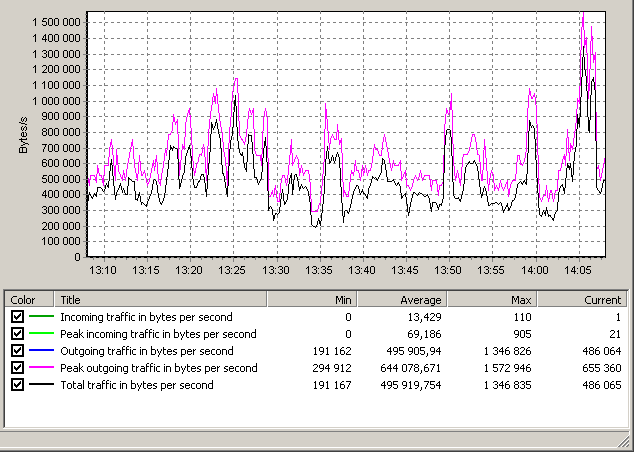
634x452 (17649 bytes)


This graphic can reports last 5 mins, 1 hour, 24 hours traffic on your domain.
You can configure them at domain level / logs & reports see : Domains

You can zoom with your mouse on graphic areas and save the graph to file by right clicking on it and selecting "save as ...".